Your laptop is the single most important piece of equipment you’ll own in college. Everything runs through it — assignments, research, communication with professors, streaming when you need a break. If you don’t have one yet, prioritize battery life and portability over raw power unless you’re in engineering, computer science, or video production. Most students need something that lasts 8-10 hours on a charge, weighs under 4 pounds, and handles Google Docs, Zoom, and having twenty browser tabs open simultaneously.
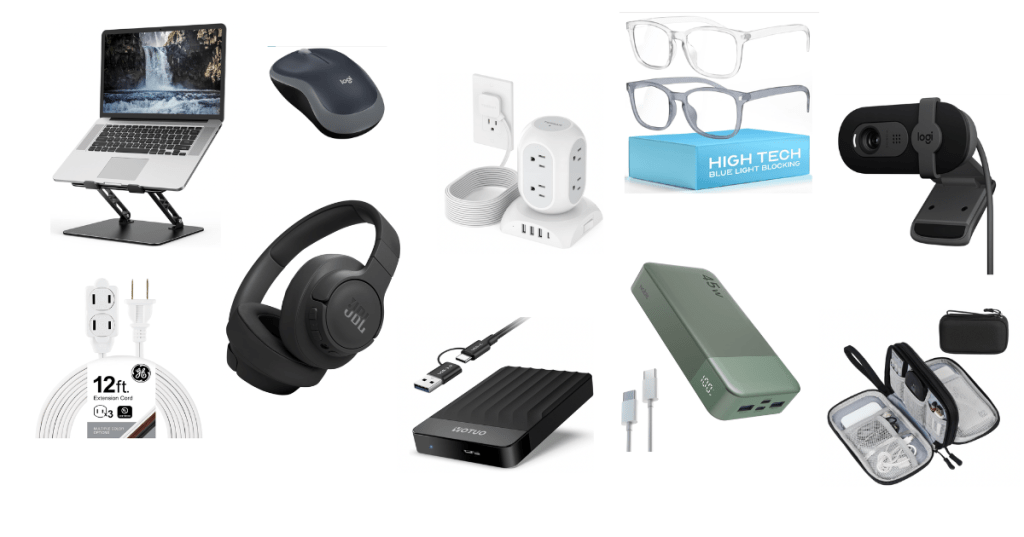
A laptop stand improves your setup immediately. Raising your screen to eye level prevents neck strain during long study sessions. Look for something adjustable that creates space underneath for your keyboard or notebooks. Portable folding stands work if you move between your desk, library, and coffee shops. Heavier fixed stands are fine if you’re staying at your desk.
Get a wireless mouse. Trackpads are fine for casual use but terrible for hours of detailed work, essay editing, or anything requiring precision clicking. A basic wireless mouse costs less than lunch and saves your wrist. Rechargeable versions eliminate the battery replacement annoyance.
Noise-canceling headphones or good earbuds are non-negotiable. Dorms are loud. Your roommate has different sleep and study schedules. The floor above you throws things at 2am. You need the ability to create silence or listen to focus music without distractions. Over-ear headphones block more sound but are bulkier. Quality earbuds are portable and work for the gym or walking between classes. Pick based on your priorities but don’t skip this category.
A portable charger keeps your phone alive between classes. You’ll forget to charge overnight, or you’ll burn through battery using navigation and texting all day. A 10,000mAh power bank gives you two or three full phone charges and fits in your backpack. USB-C models charge faster.
Your charging situation needs organization or it becomes a tangled mess of cables. A charging station or multi-port USB hub sits on your desk and handles your phone, laptop, headphones, and watch all at once. Alternatively, get a few extra-long charging cables so you can charge devices while using them in bed or at your desk without stretching.
An external hard drive or cloud storage subscription backs up everything important. Laptops fail, files corrupt, and your thesis disappearing twelve hours before the deadline is not hypothetical — it happens constantly. A 1TB external drive costs less than a textbook and holds everything you’ll create in four years. Plug it in once a week and run a backup. Cloud options like Google Drive or Dropbox work too if you’re diligent about saving there.
A surge protector with multiple outlets is mandatory. Dorm rooms have maybe two outlets total and you have six things to plug in. Get one with at least six outlets and USB ports built in. Braided or flat cables are more durable than cheap round ones.
Blue light glasses reduce eye strain if you’re staring at screens for ten hours a day. The research is mixed on whether they’re medically necessary, but many students report fewer headaches and better sleep when they wear them in the evening. Inexpensive and worth trying.
A small desk lamp with adjustable brightness helps when your roommate is asleep and you’re still working. Clip-on models attach to your desk or headboard. LED versions don’t generate heat and last forever. Warm light is easier on your eyes late at night than harsh white light.
A webcam and microphone upgrade matters if you’re doing a lot of Zoom classes, meetings, or presentations. Laptop built-in cameras are mediocre. A standalone 1080p webcam makes you look significantly more professional in office hours or group projects. If you’re in a noisy dorm, a USB microphone with a mute button improves your audio quality.
Extension cords give you flexibility when outlets are in terrible locations, which they always are in dorms. A 10-foot cord lets you rearrange your furniture without being tethered to the wall.
Cable organizers or velcro ties keep cords from becoming a rat’s nest under your desk. You’ll thank yourself every time you need to find the right cable.
Skip expensive tech you won’t use. Most students don’t need tablets, smart speakers, printers (campus libraries have free printing), or dual monitors. If you’re not sure you need it, you don’t.
Quick Reference: Tech & Electronics
| Product | Purpose | Approx. Price |
|---|---|---|
| Laptop StandAdjustable | Ergonomic screen positioning | $25-$50 |
| Wireless Mouse | Comfortable navigation | $15-$30 |
| Noise-Canceling Headphones | Focus and sound blocking | $50-$200 |
| Portable Charger10,000mAh | Phone backup power | $25-$40 |
| Charging Station / Multi-Port Hub | Organized charging | $20-$40 |
| External Hard Drive1TB | Backup storage | $50-$70 |
| Surge Protector with USB | Multiple outlets and device charging | $20-$35 |
| Blue Light Glasses | Eye strain reduction | $15-$25 |
| Adjustable Desk Lamp | Task lighting | $20-$40 |
| 1080p Webcam | Video call quality | $40-$80 |
| Extension Cord10 ft | Outlet access | $10-$15 |
| Cable Organizers | Cord management | $8-$15 |
 Student Supply Guide